Create a Custom Treatment Plan
Build a treatment plan from scratch — select the patient, diagnoses, medication, and consent forms, then define dosing, titration, and pricing.
Create a custom treatment plan when you need full control over a patient's protocol instead of starting from a template.
When to create a custom plan
Assigning a package is the fastest way to start a patient on treatment — it pre-fills the medication, schedule, pricing, and consents from a template. Create a custom treatment plan when:
- No existing package matches the patient's protocol
- You need to modify dosage, titration, or duration beyond what a package allows
- You're prescribing a one-off or experimental protocol
Before you start
Your prescriber credentials must be on file before you can finalize any treatment plan. If you haven't added them yet, see Set Up Prescriber Credentials.
The patient must already exist in your patient list. If not, add them first.
Where to find it
In the sidebar, select Treatment Plans (in the CARE group), then select New Treatment. The first screen is titled Set treatment details.
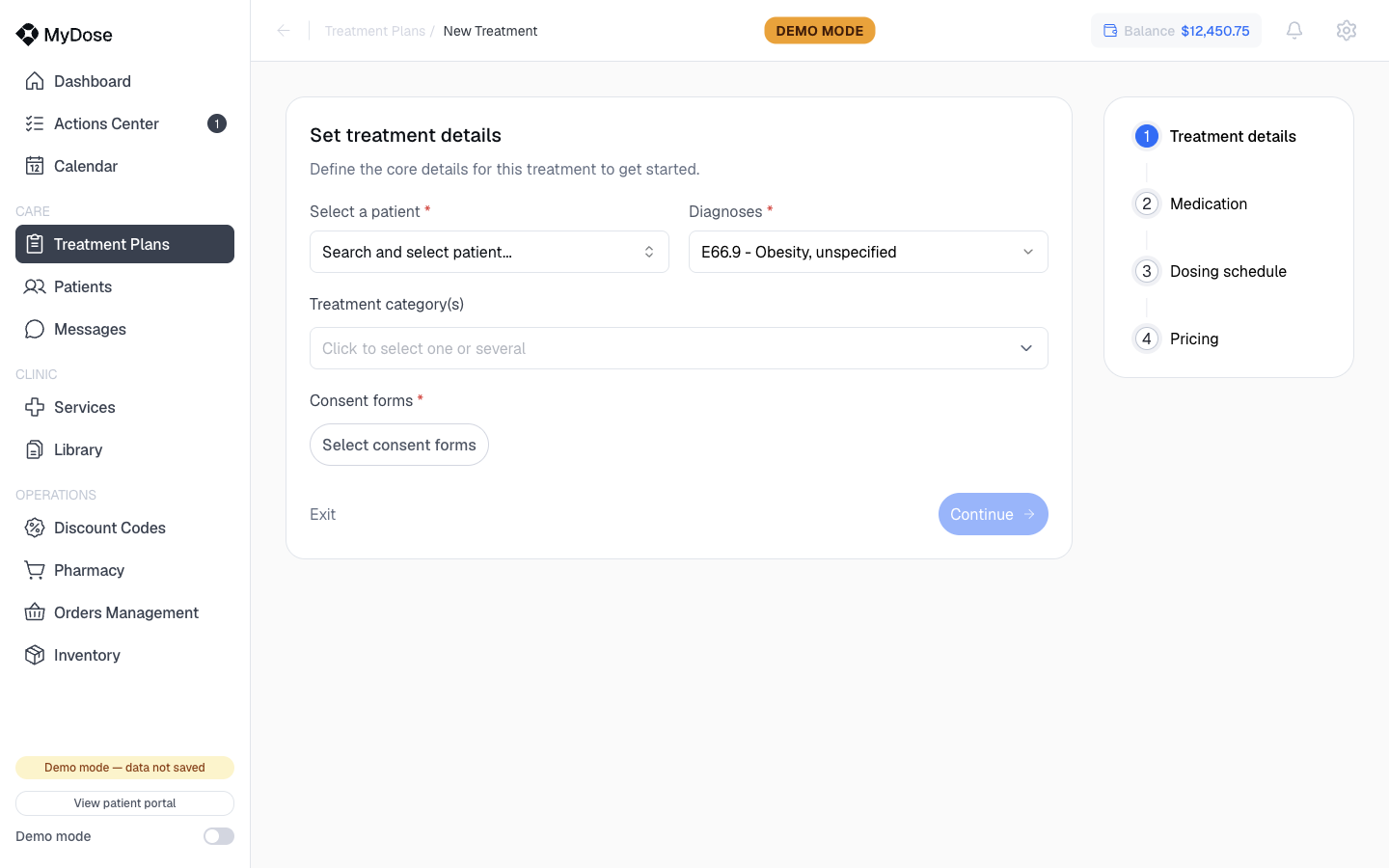
Set treatment details
Select the patient
Open the Select a patient dropdown and choose the patient this plan is for.
Add diagnoses
Use the Diagnoses selector to add one or more ICD codes — for example, E66.9 - Obesity, unspecified.
Choose the medication
Open the medication selector (Click to select one or several) and pick one or several medications for the plan.
Attach consent forms
Use Select consent forms to attach the forms the patient must sign before treatment begins. You can attach multiple forms.
Continue
Select Continue to move on to dosing and pricing, or Exit to leave the wizard.
Continue stays disabled until the required fields are set. If it looks unclickable, check for an empty field above.
Define dosing, titration, and pricing
After the details screen, you build the treatment schedule and set pricing. This uses the same schedule-builder mechanics as the package wizard — for each phase you set:
- Dose — the amount and unit for the phase
- Frequency — how often the patient takes the dose
- Duration — how long the phase runs
- SIG instructions — the directions the patient follows
- Clinical justification — the rationale recorded with the plan
Add multiple phases to titrate the dose over time — for example, a starter phase, a step-up, and a maintenance phase. These phases become the plan's Treatment Timeline once it's active. Then set the plan's pricing before you finish.
For a field-by-field walkthrough of the schedule builder and pricing, see Create a Service Package — the mechanics are identical.
What happens next
The new plan appears on the Treatment Plans list, where you can track its status (Pending, Active, or Draft), open it, and manage it over the course of treatment.
| Field on Set treatment details | What it's for |
|---|---|
| Select a patient | The patient the plan is written for |
| Diagnoses | ICD codes supporting the treatment, e.g. E66.9 - Obesity, unspecified |
| Medication selector | One or several medications included in the plan |
| Select consent forms | Forms the patient signs before treatment begins |
Related
Assign a Package
The faster path — start a patient on a pre-built package instead.
Create a Service Package
Deep dive on the schedule builder and pricing mechanics.
Manage Treatment Plans
Track, filter, and act on plans after they're created.
Set Up Prescriber Credentials
The prerequisite for finalizing any treatment plan.